

There are plenty of email marketing tools out there, but only one truly stands out for me. That tool is Ecomail, a Czech email marketing platform I’ve been using for years across a wide range of projects — from small blogs to large e-commerce stores with hundreds of thousands of customers. This Ecomail review breaks down exactly why.
I’ve sent millions of emails through Ecomail and generated e-commerce conversions worth tens of millions. It was Ecomail that made email marketing an integral part of our marketing strategies (which Lucka and I develop through LK Media), and I consider Ecomail one of the most valuable tools we pay for on an ongoing basis.
Why is Ecomail my go-to tool for email campaigns, what can it do, and what is it best suited for? Let’s dive into this comprehensive review.
What Is Ecomail and What Is It Used For
Ecomail is a Czech email marketing tool. It integrates with a wide range of e-commerce solutions and CMS platforms (Shoptet, WordPress, etc.), pulling in data about your customers and readers and storing it in its own database.
Ecomail’s core function is sending email campaigns (newsletters) — either to your entire database or selectively to specific customer groups that you can easily filter.
You design your emails directly in the app using a convenient editor and send them either as one-off campaigns or through automations.
Where Ecomail really shines is in its automations, which are brilliantly designed and easy to manage. For example, at nanoSPACE, we make heavy use of automations for sending post-purchase guides, discount coupons for specific products, and reminders to reorder replacement parts.
Ecomail can also send SMS campaigns, integrates with Facebook and Sklik (a Czech PPC platform), and features a well-built tracker that monitors user behaviour on your website.
Key Pros and Cons of Ecomail

A major advantage is that Ecomail is a Czech product. Their tech support works in CET hours and is available when you need it. The app is available in Czech (and English), and as one of the few mailing platforms, it’s fully compliant with Czech and EU legislation. It also boasts excellent deliverability to Czech email addresses.
You can connect Ecomail to most CMS solutions without any coding knowledge — most platforms have a free plugin available.
The app is incredibly easy to use and anyone can set it up, yet Ecomail also packs plenty of advanced features that you can gradually unlock as you grow.
You can try Ecomail for free — with up to 200 contacts.
That said, the app could use better analytics built on top of the user data it collects — there’s potential there that isn’t being fully tapped yet.
| Ecomail Pros | Ecomail Cons |
| ✅ Czech app | ❌ Risky e-shops get moved to IP pools with a worse reputation |
| ✅ Easy connection to CMSs and e-shops | ❌ Advanced analytics and RFM analysis only in the priciest CDP plan |
| ✅ Flexible pricing | ❌ The AI agent EMA currently speaks only Czech and Slovak |
| ✅ Easy to use, advanced features | |
| ✅ Fast, well-informed support | |
| ✅ AI right in the editor and the Czech AI agent EMA |
How Much Does Ecomail Cost
Ecomail offers three plans – Profi, Marketer+ and CDP – and the price of each depends on the number of active contacts you have in your database. You can also buy credits to avoid a monthly payment (5,000 emails for €65, 200,000 emails for €490), but that only makes sense if you plan occasional campaigns without advanced features.
As a general rule, the Profi plan is for smaller websites that mainly need to send newsletters, Marketer+ is for e-shops (it adds integrations, an API and behaviour-based automations), and CDP is for those who want to get the most out of their data – it also includes RFM analysis, smart product recommendations and advanced analytics. I recommend at least the Marketer+ plan to every e-shop, and I’ve yet to see a case where Ecomail didn’t pay for itself with the very first campaign.
| Number of contacts / Plan | Profi | Marketer+ | CDP |
| up to 200 | free | free | – |
| up to 500 | €6 | €8 | €82 |
| 2,000 | €16 | €20 | €94 |
| 5,000 | €33 | €49 | €119 |
| 20,000 | €82 | €123 | €193 |
| 40,000 | €127 | €190 | €303 |
On top of any plan, you can also buy AI credits, which are used up by the AI features in the app. A thousand credits cost less than €0.05, so in normal use it’s an item you’ll practically never spot on your invoice.
💡 TIP: If you’re planning to use an integration (Shoptet, Prestashop, etc.), reach out to their support after registering. Here’s a little insider tip — you can get 14 days of free access to any plan for testing purposes 😉
Ecomail Features
Ecomail offers a solid range of useful features without being overwhelmingly complex like some competing tools (looking at you, ActiveCampaign 👀). You can find your way around Ecomail within minutes and start creating right away.
Here’s an overview of Ecomail’s basic and advanced features, along with real-world examples of how I use them.
Artificial Intelligence in Ecomail: the EMA agent, AI in the editor, and connecting to ChatGPT or Claude
The biggest change since I first wrote this review is artificial intelligence. Thankfully, Ecomail didn’t just slap it onto the app as a marketing sticker – when I’m preparing a campaign, it genuinely takes work off my plate.
AI right in the editor
The feature I use most often is generating the email subject line and preheader. I type what the campaign is about, Ecomail spits out variants, and I send two of them straight into an A/B test – that’s exactly the kind of work people used to put off until the last minute.
Above the text in a template, you’ll then find the Improve, Rephrase, Lengthen and Shorten actions. I use shortening the most – when the text doesn’t fit into a block and you need to trim it by a couple of sentences without losing the point.
Creating subject lines and editing text are available on all plans, including the cheapest one, while AI chat for a longer conversation about your text is only available on the Marketer+ and CDP plans.
The AI agent EMA
In June 2026, Ecomail added its own AI agent, EMA. It speaks Czech, is part of every plan, and unlike text chatbots it reaches right into your account. It can:
- design a newsletter template in your brand colours, with your logo and font,
- pick the segment the campaign should go out to,
- build an entire automation flow including triggers, conditions and individual emails,
- prepare both an email and an SMS campaign,
- summarise campaign results (open rate, click-throughs) and tell you what to change next time,
- go through your database and deliverability and suggest next steps.
I treat it as a quick first draft, not finished work. I always go through the flow EMA builds and reconfigure it – with more complex post-purchase automations (like the spare-parts one I describe below), there’s no way around knowing your own data anyway. The same goes for copy: the output is usable, but I rewrite it into the brand’s tone myself. Where EMA saves the most time is the routine stuff – the first version of a template, a segment proposal and a report summary.
You have to confirm every change to your account, EMA only works with your data, and that data isn’t used to train models.
Connecting your account to ChatGPT, Claude or Cursor (MCP)
The new feature that probably pleased me the most: Ecomail launched an MCP server, which lets you connect your account to ChatGPT, Claude or Cursor and ask about your data in natural language – no clicking through the app and no exports to Excel.
This practically works around even the analytics gripe I have in this review – whatever you can’t click your way to in the interface, you simply ask about. The connection runs via OAuth, so you don’t hand your login credentials to the AI tool, and when you connect it you can see which data you’re giving it access to. The MCP server itself is included in the free plans; you only pay for the AI tool you use.
Bulk One-Off Campaigns
The most fundamental feature is the ability to send bulk one-off campaigns. You create an email in the app, select your recipients (the entire database or a specific segment), schedule the send, and wait for results.
Bulk Campaign Example
At nanoSPACE, we hold an annual event called Nanoday every September — on 10 September, we run a major sale that we support with a mass email campaign.

We designed the email in the editor (preview here — we’ll take a closer look at the editor further below) and ran an A/B test with two subject lines:
- Nanoday: 25% off everything
- 😍 25% off everything
Email marketing specialists will tell you that emojis in subject lines hurt deliverability and produce worse results. That was indeed the case here (though based on our experience, it’s not always true) — people were more likely to open the email with the subject Nanoday: 25% off everything. Ecomail tested on a 20% sample and determined that this variant performed better, then sent the winning version to the remaining 80% of contacts. Here are the results:

As you can see, Ecomail provides fairly detailed campaign analytics. You’ll find:
- Open rate,
- Click rate,
- Number of bounced emails,
- Number of unsubscribes,
- Revenue generated from that email (this tends to be lower than what Google Analytics shows, as Ecomail only tracks revenue for registered and logged-in customers),
- Click map,
- Campaign performance over time,
- Mobile vs. desktop open ratio,
- Demographic data (if you collect order information),
- And more.
Each campaign and its results stay in your campaign overview, where you can also compare campaigns against each other.

A/B Testing
When setting up a campaign, you can choose from several A/B test options. You can test the sender name, subject line, and content. I always recommend testing just one variable at a time.
Before sending the campaign, Ecomail asks what percentage of your database you’d like to use for the A/B test. If you choose 20%, Ecomail sends version A to 10% of your database and version B to the other 10%. It then waits for a set period (say, 2 hours) and sends the winning variant to the rest of your contacts.

Automations
Ecomail comes with several pre-built automations that essentially require zero effort — just switch them on (and optionally customise their emails to match your brand). These include:
- Thank-you email after subscribing to the newsletter.
- First-purchase discount after signing up.
- Abandoned cart reminder.
- Reactivation campaign for e-commerce.
- Name day greeting.
- Birthday greeting.
- First-purchase anniversary.
- E-book download.
Of course, you can also create fully custom automations tailored to your needs.
Automation Example
At nanoSPACE, we sell air purifiers that come with replacement parts needing periodic swaps. Customers can easily forget about this, simply not bother, or — worst case — buy the parts from a competitor.
So we built an automation that monitors orders. Whenever someone purchases one of these products, it starts a countdown (typically set to 80% of the replacement part’s lifespan) and once the timer expires, it automatically sends the customer an email reminding them to buy a new filter — complete with a discount coupon.
An automation like this can be as simple or as complex as you need — it all depends on how granular you want to get. We have a separate email for each air purifier model, since each one requires different replacement parts.

Discount Coupons
Ecomail handles discount coupons brilliantly and can manage any quantity. Across our own and client projects, we’ve distributed hundreds of thousands of coupons. You upload them to Ecomail via CSV or simply copy-paste, and there’s no limit on how many you can use.
Here’s a screenshot from the admin panel showing several types of discount coupons. We use unique coupons exclusively, which are inserted dynamically into emails using merge tags.
This means you can send unique, single-use discount coupons through automations — for example, as a reward when a customer reaches 200 € in total order value.

SMS Campaigns
Planning a larger marketing push? You can back it up with an SMS campaign directly within Ecomail. As long as you have consent from your customers to send promotional SMS messages and you’re passing phone numbers into Ecomail, you’re good to go.
Ecomail can send SMS messages to a wide range of countries, though for us the Czech Republic is what matters most. The price of a single SMS to the Czech Republic is about €0.05, to Slovakia around €0.05, to Poland about €0.05 and, say, to Germany around €0.09 – with SMS the pricing varies from country to country, and credits are bought separately.
By default, the sender name shows up as a generic label on recipients’ phones, but you can pay extra to display your brand name instead — for example, NANOSPACE.

Ecomail’s Facebook Integration
Ecomail’s Facebook integration is solid, and I’d recommend it for any larger project.
Facebook Lead Ads
You can use Ecomail to collect contacts from Facebook campaigns. Facebook Lead Ads can push collected emails directly into Ecomail. Using automations, you can then immediately reach out to these contacts with a welcome offer and add them to your regular mailing list.
Custom Audiences from Your Contact Database
Right inside Ecomail, you can define dynamically generated audiences that are automatically synced to your Facebook Custom Audiences (the audiences you target with ads). Ecomail tracks every contact, and when one meets your defined conditions, it’s automatically added to the audience and pushed to Facebook. Likewise, contacts are removed when they no longer qualify — for example, after they make a purchase.
Facebook Ads from Ecomail
I don’t use this feature much personally, but I can see plenty of use cases. You can create Facebook ads directly from Ecomail based on defined conditions. For example, you send a campaign but only 10% of contacts open it (while your usual open rate is around 20%), and the email contains a discount coupon. In Ecomail, you can then create a Facebook ad targeting those who didn’t open the newsletter, boosting the reach of your message.

Ecomail’s Sklik Integration
Just like with Facebook, Ecomail can also integrate with Sklik (a Czech PPC platform similar to Google Ads), though the functionality is limited to creating user audiences for advertising.
ContactSpotlight
This is a premium service available on top of your plan, but it’s well worth using at least once. Your contact database can contain entries of varying quality, and so-called spam traps can easily sneak in — these are addresses designed to detect whether you’re sending unsolicited emails. Unfortunately, even legitimate businesses can get caught, simply because they don’t use double opt-in verification.
ContactSpotlight scans your entire database (or an uploaded spreadsheet) and identifies all invalid, non-existent, inactive addresses, spam traps, and hard bounces. You’ll want to remove those promptly.
Drag & Drop Email Editor
Ecomail is constantly improving its email editor, so the screenshots below may already look different by the time you read this.
The editor automatically creates responsive versions of your emails, so you only need to design one variant and Ecomail takes care of proper display on mobile devices. The Preview function shows you exactly how your email will look, and you can also send yourself a test email (handy if you’re testing merge tags, for instance).
You don’t need to know any code to create beautiful emails — Ecomail includes a library of attractive templates that you can customise in just a few clicks.
The editor also offers a range of pre-built content blocks and natively supports columns (something many editors struggle with). You can even save your custom blocks and reuse them later.

TIP: If you’re stuck with a template or want to make more significant changes but don’t have a developer, reach out to Ecomail’s support. They offer a paid service where, depending on the package, they can take over the creation of your emails and automations.
Product and Data Feeds
To insert products into your campaign and automation emails, you can use product feeds. Ecomail works with feeds from comparison shopping engines like Heureka or Zboží.cz (popular in the Czech market).
More advanced users will appreciate the ability to upload custom data feeds. These have no strict structural requirements, so you can essentially push any data into Ecomail and automatically output it in your emails.

Personalisation
Thanks to the wealth of user data Ecomail collects, you have powerful personalisation capabilities at your fingertips. Using merge tags, you can send automated emails with dynamic content based on conditions you define. Here are some examples:
- A customer browses products in category A — you send them an email highlighting the two best-selling products in that category.
- A customer places an order with a delivery address near your physical store or pickup point — you send them an email inviting them to visit the shop.
- A customer buys a product from category A — a week later, you send them recommendations for related products from the same category.

Working with Contacts
Contact management in Ecomail is straightforward and intuitive. Even advanced segmentation is just a matter of a few clicks and selecting conditions. The hardest part is figuring out which conditions to use for the segment you need.
Collecting Contacts
You can collect contacts in Ecomail through plugins, API, or sign-up forms. For the latter, there’s a drag & drop editor that can automatically tag collected contacts based on where they signed up.
You can also import contacts manually, but I wouldn’t recommend this — except perhaps for initial setup. Manually imported contacts lack all the accompanying data.
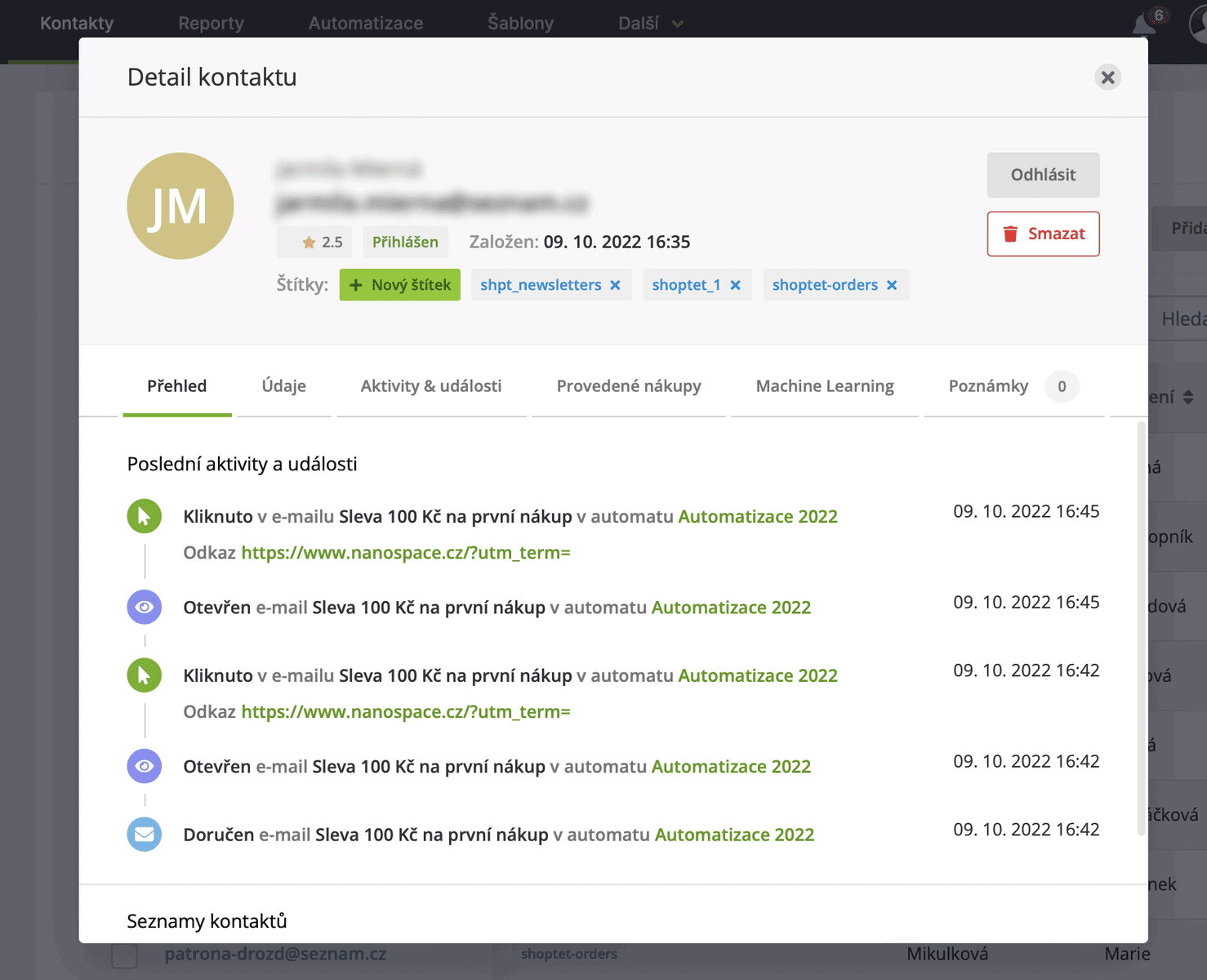
When using the API or a plugin that sends complete data, a user profile can look like this — including a full order history:
Segmentation
Customer segmentation is where Ecomail’s real power lies. Email marketing experts have been saying for a while now that it’s time to move away from mass sends (which statistically produce the worst results) and focus on smaller, more targeted campaigns. That’s exactly what segmentation is for.
Segmentation lets you filter customers using rules, then use those lists in automations or campaigns. For example:
- Active, frequent buyers get emails more often — likely featuring new arrivals and product launches.
- Customers who haven’t purchased in the last 6 months receive a discount coupon to encourage a new order.
You can segment by contact properties and contact activity.
Contact Properties
Contact properties are mostly static and don’t change over time — they’re primarily used to distinguish by gender, age, location, or registration date. We use them to split campaigns between men and women, for geolocation-based campaigns (e.g., targeting only Prague), or for sending birthday and name-day coupons.
Contact properties also include tags and contact source. I rely heavily on tags within automations — tagging contacts that have already gone through an automation (so they don’t get pulled back in immediately). Contact source is also great for automations, since you can set up different welcome emails for each source (website registration / purchase / partner site / Facebook ad).
Contact Activities
Contact activities are where you’ll trigger most of your automations and segmentations. They show how a customer behaves within a campaign, an automation, or on your website.
- For campaigns, activities show whether a contact opened the email, clicked on anything, and whether they made a purchase.
- For automations, they show whether a contact entered the automation, clicked on something, opened an email, and whether they’ve completed the automation.
- Website tracking enables segmentation based on what a customer viewed, whether they bought, what they bought, how much they spent, how many orders they have, what their order status is, and so on.
Segmentation Example
Here’s an example of creating a customer segment to send a small reward via email to people who purchased respirators from us and also made more than 2 orders:

What You Can Integrate Ecomail With
Ecomail comes with over forty ready-made integrations and add-ons for a range of systems, and if you don’t find yours on the list, you can connect via the API. You’ll find the complete documentation here.
- Shoptet
- Prestashop
- WooCommerce
- Oxyshop
- Webareal
- Shopify
- WordPress
- Magento
- Fastcentrik
- Raynet
- Make
- Zapier
- Shopsys
- Simpleshop
- Upgates
- Redbit
- Dativery
- And more
Different integrations unlock different capabilities. Here’s what’s possible:
- Transfer subscribed contacts to Ecomail (from forms or purchases) including personal data.
- Transfer complete order contents including prices and categories.
- Track user behaviour on your website (logging every page visited).
- Transfer shopping cart contents to Ecomail including product categorisation.
- Handle transactional emails through Ecomail.
Learn on Your Own and Share with Others
An active community has grown up around Ecomail (primarily Czech-speaking), and you’re welcome to join. Members share their experiences and help each other with more complex challenges. You can find this group on Facebook.
Beyond the community, Ecomail maintains an extensive library of resources to help you get started and master advanced automations:
Conclusion
In the hands of a marketer and email enthusiast, Ecomail is a seriously powerful weapon. I recommend it to anyone who sells anything online — or is planning to. It’s never too late to start building your email list.
Over the years I’ve been keeping this review updated, Ecomail has moved forward mainly in two directions: it added the CDP data plan for those who want to go really deep with segmentation, and AI, which cuts out most of the routine in preparing a campaign. But the core of the app has stayed just as simple as it always was – and that’s the best thing about it.
Today, everyone’s obsessed with building company Instagram, TikTok, and Facebook accounts. These channels certainly have their place in the marketing mix, but take one look at how social media has evolved over the past five years and you’ll realise that marketing strategies built solely on social platforms are standing on shaky ground.
People are creatures of comfort. While they’ll hop between social networks like they change socks — following whatever’s trending — they won’t give up their personal email for anything. Why? Because your email address is like your home address — changing either one is an absolute nightmare.
Want to Try Ecomail?
Interested in giving Ecomail a go? You can jump right in — it’s completely free for up to 200 contacts.
Need Help with Email Marketing?
💡 Check out our 18 tips for email marketing that generates millions in revenue.
Want to get started with email campaigns and automations but don’t know where to begin? Or are you unhappy with the results of your current campaigns? I’d love to help. You can find my contact details right here.
Ecomail Email Marketing Tool Review
Summary
I consider Ecomail to be top-tier among affordable email marketing tools. I’ve successfully deployed Ecomail on projects with annual revenues ranging from €120,000 to €6 million, and I can say one thing for certain: the investment paid for itself many times over after the very first month.
Tips and Tricks for Your Vacation
Don’t Overpay for Flights
Search for flights on Kayak. It’s our favorite search engine because it scans the websites of all airlines and always finds the cheapest connection.
Book Your Accommodation Smartly
The best experiences we’ve had when looking for accommodation (from Alaska to Morocco) are with Booking.com, where hotels, apartments, and entire houses are usually the cheapest and most widely available.
Don’t Forget Travel Insurance
Good travel insurance will protect you against illness, accidents, theft, or flight cancellations. We’ve had a few hospital visits abroad, so we know how important it is to have proper insurance arranged.
Where we insure ourselves: SafetyWing (simple monthly subscription) and TrueTraveller (for extra-long trips).
Find the Best Experiences
Get Your Guide is a huge online marketplace where you can book guided walks, trips, skip-the-line tickets, tours, and much more. We always find some extra fun there!


