

Last year, we were all scrambling to implement a functional cookie consent banner and dealing with the resulting data loss. Larger companies invested in data analytics and worked on modelling the missing data, while the rest of us either didn’t enable the banners at all or simply accepted that Google Analytics could no longer be trusted. Here’s our takeaway from Data Restart 2022 — the leading data analytics conference — and what you can do about the cookie apocalypse right now.
Over the past 12 months, a number of ways to tackle the data drop have emerged and improved. Google Analytics 4, Server-side Google Tag Manager, Consent Rate measurement, Enhanced Conversions and Consent Mode for Google Ads, Conversion API for Facebook, and more.
Just when we e-shop managers started to breathe a little easier, data analysts began sounding the alarm again: for roughly the next three years, there will be a vacuum in which 3rd-party cookies (which we all rely on for ad targeting) disappear from browsers, while no systemic solution is ready to replace them — one that would let us keep serving relevant ads that customers appreciate and that generate revenue.
The ePrivacy Regulation, which is supposed to eliminate cookie banners and allow users to set preferences directly in their browser, won’t come into force until at least 2025.
That’s why I headed to Data Restart — organised by Taste Academy — as I do every year, to hear how the best data analysts in the Czech Republic are preparing for the data apocalypse.
I’m not a data analyst myself, and I’m not a developer either. I’m writing this summary for everyone in a similar position to mine. You’re responsible for online marketing and the performance of your entire marketing mix, but you don’t have developers on hand or the budget to hire a team of data analysts. Yet you still need to keep things running, because your business depends on online.
So let’s dive in 🙂
Less Customer Data, More Estimates
For the past 20 years, online marketers and data analysts have revelled in a data jungle. We measured everything, everyone, everywhere. There was so much data that you could easily create a campaign offering a free coffee with cake to all secondary school students who walked within 100 metres of your shop between Monday and Friday. We knew about our customers:
- which websites they visited
- what they did on those websites
- what they purchased
- what topics they liked reading about
- which devices they used to visit us
- what electronics they owned
- where they worked
- which shops and stores they visited
- what they did in their spare time
- ….
Those days are over (and, frankly, that’s a good thing). Since 2022, users have the right to choose whether we can track them on our websites or not. This simple mechanism means that media houses, despite their best efforts, are losing roughly 20% of their data, while e-shops can easily lose 50%.
Users express their preference via the so-called “cookie banner,” though soon it won’t just be about cookies — because their days are numbered too.
Technological Changes in Browsers — The End of Cookies
It started with ad blockers, which simply strip ads from websites and block the storage of 3rd-party cookies in the browser. Users install ad blockers proactively, and data professionals have more or less learned to live with them.
💡 What are 3rd-party cookies? Third-party cookies are cookies stored in your browser by a website other than the one you’re currently visiting. For example, cookies from advertising platforms (like Google) that use the cookie to track your activity across the websites where they run ads.
But browsers themselves have also started blocking 3rd-party cookies, which makes the problem much bigger. Firefox and Safari block 3rd-party cookies by default — this currently affects roughly 30% of web traffic, and that number will only grow, because it’s just a matter of time before other browsers, including Google Chrome, follow suit.
Due to the blocking of 3rd-party cookies, we’re losing data for remarketing, customer segmentation, and other marketing tools — without which, under the current setup of ad platforms, we should expect a significant drop in revenue.
Google Privacy Sandbox
Google keeps delaying the rollout of cookie blocking in Chrome because it’s searching for a replacement solution. In simple terms: how to continue profiling users without needing 3rd-party data. One of the approaches being considered is Google Privacy Sandbox in Google Chrome. The browser itself will continue collecting data, but it won’t send all of it to ad platforms. Instead, it will only provide them with a user profile (e.g. that the user is interested in Apple iPhones).
Czech Ad ID
In the Czech Republic, an alternative approach to profiling users without cookies is emerging. Two major Czech digital players — Seznam and CPEx — have jointly created and launched the Czech Ad ID project, which enables ad targeting without the need for cookies. Instead, matching will be based on email addresses. Sounds like 2000 all over again? And what about GDPR?
Anyone can join Czech Ad ID; the only requirement is to use one-way email hashing. You hash the customer’s email on your end and send it to Czech Ad ID, which stores the hash in a database. Over time, this builds up a customer profile that can be targeted through programmatic advertising.
Just as with other forms of tracking, you’ll still need the user’s consent for processing their data for marketing purposes (Hello, cookie banner!).
How to Tackle the Data Loss Right Now
As the volume and reliability of your data decline, your ad performance will drop too (at least according to the reports from ad platforms) — regardless of where or how much you’re spending. Let’s look at what you can do to rescue your data right now (apologies to the analysts out there, but no, the average e-shop definitely hasn’t deployed this full tool stack yet 🙃).
Deploy a Functional Cookie Banner
Let’s be honest: you don’t have a functional cookie banner, we don’t have a functional cookie banner… Until now, data was far too valuable to voluntarily give up by deploying a banner that users mindlessly dismiss.
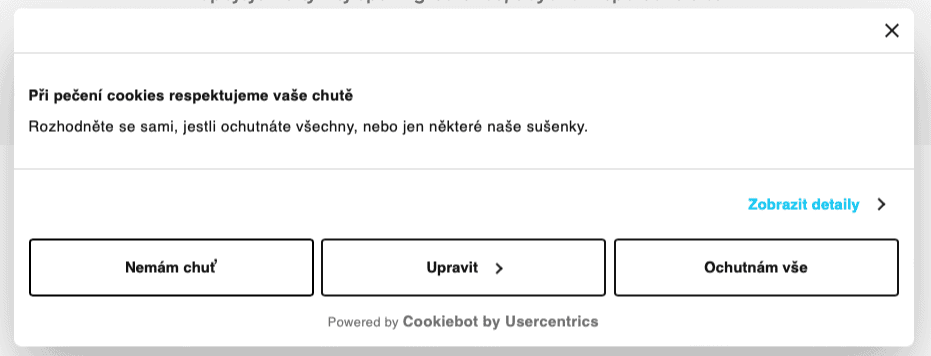
A functional cookie banner means that no tracking fires on the website until the user explicitly gives their consent. We don’t track even when the user doesn’t refuse (i.e. they close the banner or ignore it).
Ad platforms are starting to require a functional banner, and you simply can’t get by without one anymore. At the conference, I heard several stories about Google blocking an entire Ads account because the e-shop wasn’t collecting user consents.
If you’re deploying Google Enhanced Conversions, Google now explicitly asks you to set up Google Consent Mode, which requires a properly implemented cookie banner.
💡How to deploy a cookie banner? Try Cookiebot. It costs around $50/month at most and includes everything you need. It’s what we use.
Set Up Google Ads Enhanced Conversions
If you’re using Shopify, WooCommerce, or another off-the-shelf e-commerce solution, setting up Google Enhanced Conversions is straightforward — you just need to add a token to the plugin. So what does it actually do?
Your e-shop sends hashed 1st-party data (customer information provided during checkout) to Google, which then matches it against its own data to calculate additional conversions. The result is a so-called lift — a percentage showing how many extra conversions Google attributed to your Google Ads campaigns.
The outcome is more accurate reporting, better conversion attribution, and improved data-driven ad optimisation. Use Enhanced Conversions alongside your standard Google Analytics tracking.
💡How to set up Google Enhanced Conversions? For example, via GTM.
Set Up Google Consent Mode
When you deploy a cookie banner, you should also set up Google Consent Mode at the same time. It’s an open API from Google that receives information about users’ consent or refusal of tracking. It can even utilise anonymised data from users who declined tracking. While you won’t see this data in Google Analytics, Google uses it for further modelling and data estimation.
💡How to set up Google Consent Mode? Check out this guide series from H1.cz (in Czech).
Deploy Facebook Conversion API
If you advertise on Facebook, make sure you’re using their Conversion API. It works similarly to Google Enhanced Conversions. You send order information to Facebook via an alternative route, independent of browser settings. This helps Facebook better attribute and calculate conversions.
CAPI is designed as a complement to the Meta Pixel, so ideally you should be sending data through both channels.
💡 How to deploy Facebook Conversion API? Read the article on cernovsky.cz (in Czech).
Measure Your Consent Rate
Deploying a cookie banner isn’t the end of the story. You need to measure the number of consents, the number of refusals, and the number of people who fall into the grey zone (neither consenting nor refusing). Together, these make up your Consent Rate.
You compare the number of page views with consent and divide it by the total number of page views. This tells you exactly how much data you’re actually losing in your analytics.
💡How to set up Consent Rate measurement? The team at Taste can help — they already have a ready-made tool for this.
Start Using Google Analytics 4
Yes! Deploy Google Analytics 4 (GA4) as soon as possible. You can run Universal Analytics (the current version of Google Analytics) and GA4 side by side, but start learning the new platform.
As of July 2023, Universal Analytics is being sunset and you’ll have no choice but to use GA4. GA4 takes a fundamentally different approach to measurement, and at first glance it may seem like you can’t find the information you’re used to seeing in UA. That’s partly true. Some data you see in UA simply won’t be measurable in the future, and GA4 doesn’t even account for it.
On the other hand, GA4 is designed to work with incomplete data. It uses algorithms to automatically model and estimate missing data. Once you’ve deployed a cookie banner, you’ll actually have higher-quality data in GA4 than you ever had in UA.
💡 How to get started with Google Analytics 4? Ideally, attend a training course. One of the best options is the GA4 Masterclass by Czech analytics expert Jan Tichý.
Deploy Server-Side Google Tag Manager
This option is more suited to those running e-shops on custom platforms with server access. By using Server-Side GTM, you theoretically don’t lose data due to cookie restrictions, because everything is tracked on the server side and isn’t dependent on browser settings.
Server-side data collection helps with modelling, because you can compare it against data captured by client-side tracking codes in Google Analytics. But remember — even for server-side tracking, you still need user consent, regardless of whether you’re sending the data anywhere or not.
Make Logging In More Attractive
The data you collect about customers in your own CRM system will become increasingly valuable, and you’ll need to feed it into advertising platforms (like Czech Ad ID or similar initiatives). Your job is to figure out how to encourage users to hand over their contact details (email or phone number). You want as many people as possible to log in on your website. Here are a few ideas:
- a shopping basket that syncs across devices
- saved sizes on fashion e-shops
- members-only sections with exclusive content or offers
CRM in a Cookieless World
Customer data has always been important, but measurement challenges (and the rising ad costs that come with them) are pushing marketers to embrace the “less glamorous” communication channels — especially working with their customer database. Honestly, when was the last time you called a customer to thank them for their order?
💡What is CRM (= Customer Relationship Management)? A CRM is any tool where you collect customer data. It could be a spreadsheet, your e-commerce platform, an email marketing tool…
Your CRM is a goldmine of information waiting to be tapped. If you connect the data correctly, you can find out — even without cookies:
- Which channels are bringing in new customers
- What made customers register with you
- Who your most loyal customers are
- Why customers leave, and what to offer them
Within your CRM, you can segment customers (by purchased items, purchase frequency, order value, etc.) and create audiences from those segments that you can target with specific campaigns (display advertising, email marketing, phone outreach, etc.).
- I’d recommend starting with an audit of your email marketing, which I consider a low-hanging fruit for most e-shops — an opportunity to earn more money with minimal effort.
- To evaluate an email campaign, you don’t need to rely on web analytics. Discount coupon usage can be reliably measured within your CRM database.
- Have a reactivation email campaign but people aren’t opening the emails? Take that segment, export the data to Facebook/Google, and try delivering the same message via paid advertising.
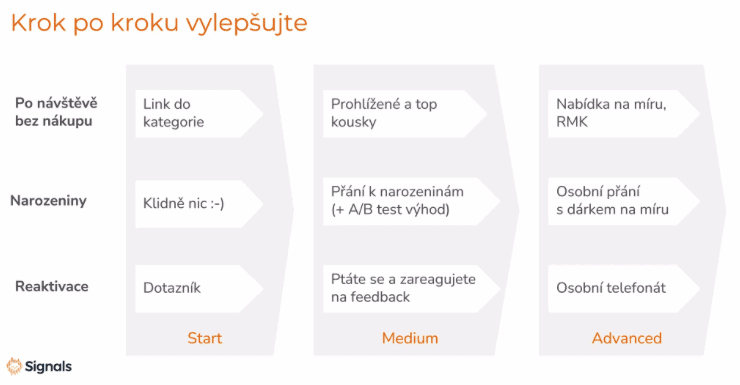
- Look after your top customers. You can personally call them on their birthday and ask what would make them happy.
- You can call customers who haven’t bought from you in over a year — not to sell, just to ask why they stopped shopping with you.
- Set up email automation (or make phone calls) targeting customers who placed a high-value order but haven’t collected it from the pickup point, risking a return.
List and Measure All Customer / Subscriber Sources
You’ll probably be surprised by the sheer number of ways customers and contacts end up in your database. Write down all the sources, review them, and optimise where possible (add incentives, etc.). Here are the typical ways customers enter the system:
During a website visit
- newsletter sign-up in the footer
- newsletter sign-up via pop-up
- newsletter sign-up from a promotional offer
During checkout
- guest checkout with newsletter opt-in
- account registration during purchase
From campaigns
- newsletter sign-up from a Facebook campaign
Offline
- in-store registration
- sign-up via offline competition at a trade fair
There are many more registration methods, and you’ll work with each source differently. Next, find out how you’re currently handling each group and whether anything can be improved. For example:
- Are you tagging the source of each contact in your database?
- What newsletters are they receiving?
- What onboarding campaigns are running for them?
- Do they have their own sales funnel?
- What do you want to do with them going forward?
Consolidate All Your Data in One Place
Choose a system where you’ll centralise your data. I use Ecomail for this, for example. What do you know about your customers that you can leverage in campaigns? Things like:
- gender
- name
- phone number
- name day, birthday
- registration date
- registration source
- reason for registration
- product categories purchased
- specific products purchased
- purchase frequency
- order value
- email engagement, etc.
And then experiment. ☺️ The possibilities for leveraging your database are practically endless. You’ll find plenty of tips in our Ecomail review and in our article with 18 practical email campaign tips.
There was much more covered at the conference. For those interested, I’ve included a list of all the presentations available for download below. Don’t forget to sign up for next year’s edition 😉
Conference Presentations
- Jan Tichý: Keynote: Analytics Is Dead. Long Live Analytics!
- Pavel Jašek: How to Run Performance Marketing With Imperfect Data
- Dominik Kosorin & Lukáš Šmol: Czech Ad ID
- Radek Kupr: Consent Rate — How We Solved the Data Drop
- Marina Mchedlishvili: How to Build Strong Data Strategies in a Post-Cookie Era
- Tomáš Bouma: Data Mesh and Personalisation Use Cases in Practice
- Hana Bartoňková & Vojtěch Říha: How Much Does One Article Earn? Connecting Web Analytics With Advertising
- Linda Appeltauer: CRM in a Cookieless World: Opportunities and Pitfalls
- Roman Appeltauer: Activating First-Party Data With SGTM
- Michal Schejbal: Data Transfers to Third Countries Outside the EU
- David Voráček: Preparing a Media House for the Post-Third-Party-Cookie Era
- David Janoušek: Performance Campaigns During the Cookie Apocalypse
Summaries From Other Sources and Agencies
Tips and Tricks for Your Vacation
Don’t Overpay for Flights
Search for flights on Kayak. It’s our favorite search engine because it scans the websites of all airlines and always finds the cheapest connection.
Book Your Accommodation Smartly
The best experiences we’ve had when looking for accommodation (from Alaska to Morocco) are with Booking.com, where hotels, apartments, and entire houses are usually the cheapest and most widely available.
Don’t Forget Travel Insurance
Good travel insurance will protect you against illness, accidents, theft, or flight cancellations. We’ve had a few hospital visits abroad, so we know how important it is to have proper insurance arranged.
Where we insure ourselves: SafetyWing (simple monthly subscription) and TrueTraveller (for extra-long trips).
Find the Best Experiences
Get Your Guide is a huge online marketplace where you can book guided walks, trips, skip-the-line tickets, tours, and much more. We always find some extra fun there!


