

Are you working as a social media manager or trying to grow your business online? Then you should be using a social media planning schedule, because consistency is everything. Download our ready-made template below!
How to Manage Social Media Like a Pro
Whether you’re creating posts on social media just for your own blog or for a large company, a content planning schedule is essential for anyone looking to take their online presence to the next level. Also check out our tips on how to create content for social media.
A social media planning schedule lets you think long-term, optimise the content you publish, and becomes an invaluable tool when evaluating individual campaigns. For bloggers, it helps build discipline, and for small businesses, it keeps communication on track.
What Should a Social Media Planning Template Include?
Your social media plan should stem from a content strategy, which is typically created on a yearly basis. This overarching strategy is then broken down into content plans for each individual distribution channel.
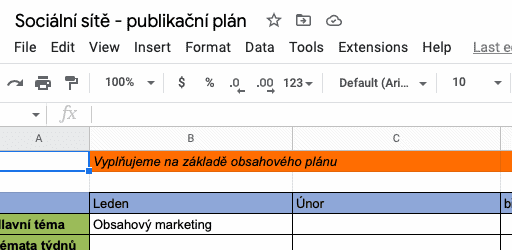
Your publishing schedule flows from there. I personally recommend combining your monthly publishing schedule and your yearly content plan into a single spreadsheet — simply for practical reasons, so you don’t have to jump between multiple tabs and marketing documents.
At a minimum, your social media content planning template should include the date when a post will be published, the content going out on social media (text + image), and the platform where you’ll be posting it.
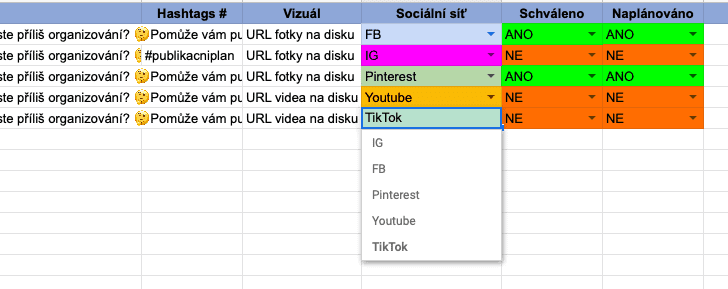
It’s also handy to have a column indicating whether a post has been scheduled, and for managers, it’s worth adding a space for approvals.
Personally, I no longer include a specific posting time in my publishing schedule because I use social media planning tools that automatically recommend the best time to post. However, if you’re not using any tools, it’s a good idea to log posting times so you can evaluate performance later on.
How Far Ahead Should You Plan?
It depends on the project — some people plan a month ahead, others just a week. The key is to plan consistently. If you go with weekly planning, make sure your plan is done every Sunday, no exceptions. For freelancers, discipline is crucial, and this simple system can help you stay on track.
Keep Your Spreadsheet Clean and Practical
Many marketers colour-code Sundays or Mondays for easier navigation within the spreadsheet. I personally go with Sundays. Don’t rush the setup — you’ll be using this template for years. Make sure to add dropdown menus and format everything according to the type of data in each cell.
Work Continuously, Plan in Batches
In the Text field, enter the post copy exactly as you want it to appear on your chosen social media platform. If the post includes an image or video, add a link to the media file — or its file name if it’s not yet online — in the second column.
The “Approved” column is for those who need content signed off by a manager or client. The easiest way to share the spreadsheet with your team is to work in Google Sheets — it’s collaborative, free, and accessible from anywhere.
Best Social Media Planning Tools in 2025
If you’re a professional or simply need to speed up your workflow, social media planning tools are a must. But why exactly?
From a single dashboard, you can schedule posts across all your social media platforms, view everything in a handy calendar, and — most importantly — access built-in analytics that help you evaluate performance.
And you can look back months into the past. Below are some of the most popular options, most of which offer a free trial lasting 7–30 days. I’d recommend testing several before committing to a paid plan.
- Buffer,
- Hootsuite,
- Loomly,
- Zoho Social,
- Sprout Social,
- Later,
- SocialBee,
- Sendible,
- Semrush,
- Tweetdeck,
- ContentCal – Adobe Express,
- Planoly.
You can read our full article on the best social media planning tools here.
Buy Our Template and Save Time
Building a social media calendar template in Excel or Google Sheets from scratch will take you 1–2 hours, depending on how comfortable you are with spreadsheets. If you’d rather skip the setup and start creating content straight away, we’ve prepared a ready-made template in both Excel and Google Docs.
The plan is set up so you can start using it right away with minimal tweaks. ☺️
More Articles for Beginners and Pros in Online Marketing
- SEO Made Simple — A Complete Guide.
- Email Marketing Tips That Generate Millions.
- How to Get Started with Affiliate Marketing.
How much does the social media publishing plan template cost?
The template costs approximately 2.50 EUR, which is less than a cup of coffee in Prague.
Will I receive the publishing plan immediately after payment?
Yes, it will be sent to your email right away.
Is there a FREE social media scheduling tool?
Tweetdeck for scheduling on Twitter is FREE, and for scheduling on Facebook and Instagram, you can use Meta Creative Studio directly from Facebook.
Tips and Tricks for Your Vacation
Don’t Overpay for Flights
Search for flights on Kayak. It’s our favorite search engine because it scans the websites of all airlines and always finds the cheapest connection.
Book Your Accommodation Smartly
The best experiences we’ve had when looking for accommodation (from Alaska to Morocco) are with Booking.com, where hotels, apartments, and entire houses are usually the cheapest and most widely available.
Don’t Forget Travel Insurance
Good travel insurance will protect you against illness, accidents, theft, or flight cancellations. We’ve had a few hospital visits abroad, so we know how important it is to have proper insurance arranged.
Where we insure ourselves: SafetyWing (simple monthly subscription) and TrueTraveller (for extra-long trips).
Find the Best Experiences
Get Your Guide is a huge online marketplace where you can book guided walks, trips, skip-the-line tickets, tours, and much more. We always find some extra fun there!


