

Setting up a Facebook page is surprisingly straightforward — yet we constantly see beginner mistakes on business profiles and blogger accounts alike. If you want to create a Facebook page that actually works for you, this guide walks you through every important step. You’ll learn how to choose the right profile picture, nail the key visual elements, and set up your first call-to-action button. Let’s get into it — here are 5 steps to build a successful Facebook page.
1) How to Create Your Facebook Page
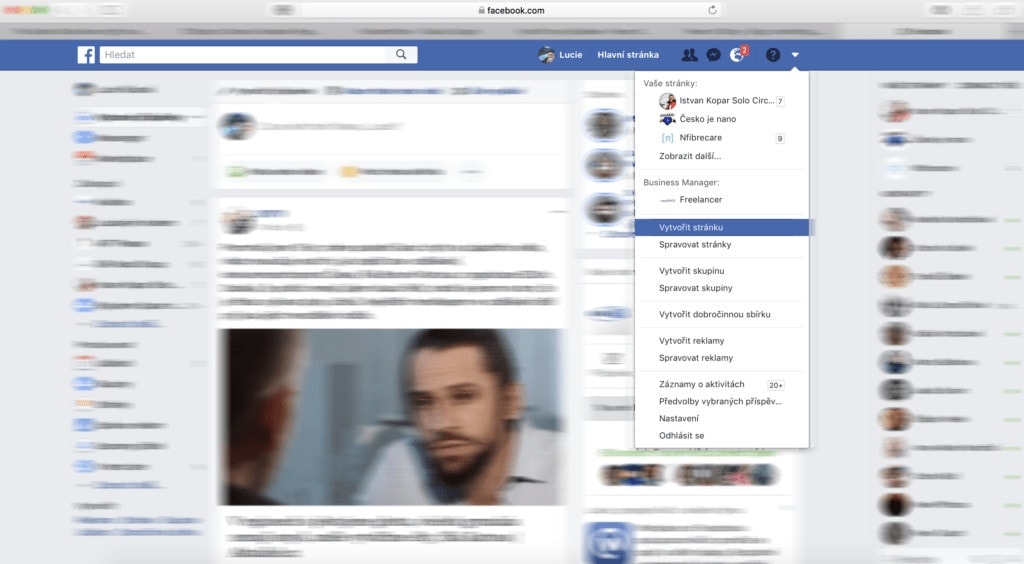
Log in to Facebook and click the arrow in the top right corner. A dropdown menu will appear — select “Create Page”.
Next, choose your page type. For personal blogs, we recommend “Artist, Band or Public Figure” or “Cause or Community”. Facebook will then prompt you to enter your page name.
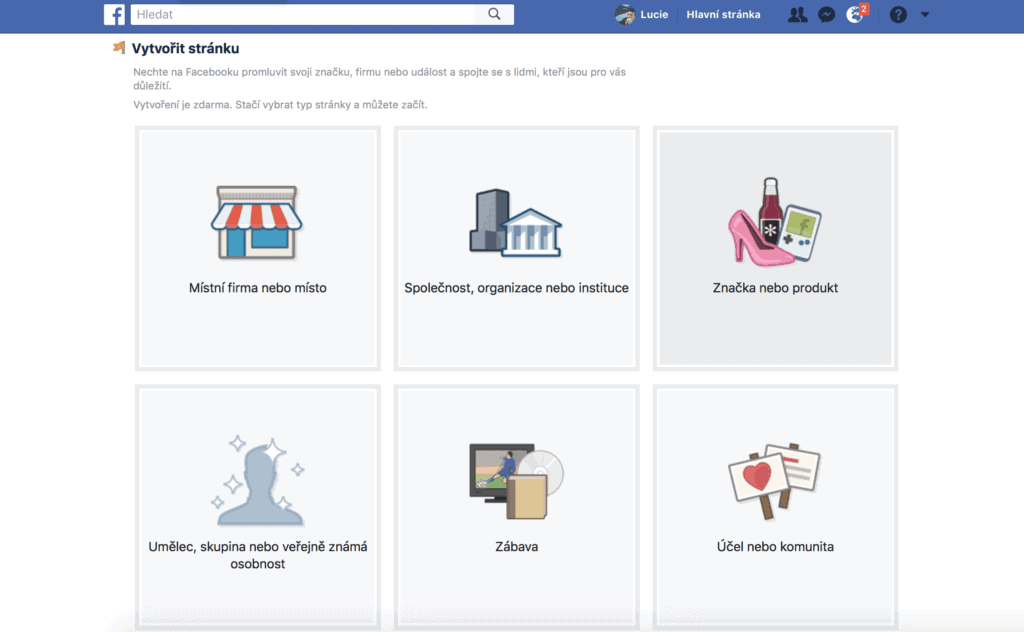
2) How to Choose Photos That Make an Impact
How do you pick the right profile photo? Your profile picture is the first thing a potential follower sees — it’s the single most important visual element on your page.
For business pages, using your company logo is standard practice. If you’re setting up a blog page, you’ve got two options.
1) You have your own logo
When should you use it as your profile photo? If you don’t want the blog to be too closely tied to your personal identity — for example, if you plan to bring other writers or contributors on board.
2) You don’t have a logo — or you want to put a personal face to your blog.
In that case, there’s no question who should be in the photo. You — and yes, that’s the right answer. It doesn’t matter whether you blog about food, travel, or fitness.
Choosing the Right Profile Photo
Put some effort into selecting your profile photo. Choose one that makes a positive impression and stick to the recommended size of 180×180 pixels. The image should be sharp and clean.

How to Take a Great Profile Photo
If you don’t have a professional photographer nearby, grab the best camera you can find and get shooting :-). Whether you’re taking the photo yourself or enlisting a friend or partner, here are a few tips to keep in mind:
- Find a clean background with as few distracting elements as possible.
- The best light always comes from a window — just don’t shoot with the window directly behind you.
- Avoid shooting in direct sunlight. If you’re outdoors on a bright day, step into the shade instead.
- Photos generally look better when taken from a slightly elevated angle — but don’t overdo it, or you’ll end up looking like a 2012 selfie.
- Smile.
- Take 20–30 photos from different angles so you’ve got plenty to choose from.
- Let your photo communicate what you do: if you’re a presenter or MC, make that obvious — don’t be afraid to include a microphone. Food bloggers can hold a cookbook and wear an apron 🙂 Fitness bloggers can show off those well-earned muscles.
- Aim for something visually memorable — a photo people will recognise at a glance.

Choosing Your Cover Photo
What makes a great cover photo? Your cover image shapes the overall look and feel of your Facebook page — so how do you get it right? There’s one key thing to keep in mind first.
This element displays differently on desktop and mobile. On desktop, it shows at 820 × 312 pixels; on mobile, it’s 640 × 360 pixels (though this varies by device). The minimum size for a cover photo is 399 × 150 pixels.
Choose a photo that clearly represents what you do — something that showcases your work at its best and grabs attention. You can also add text to your cover to explain exactly what you do and why people should follow you. Adding your logo is an option too, just don’t clutter it. For creating simple graphics, we highly recommend Canva.

You can also use a video instead — just keep it under 2 minutes and make sure it makes sense without sound. If you want to introduce yourself, don’t just film yourself talking to camera. Show what you actually do. If you do go for the talking-head approach, add subtitles.
Your cover photo is prime real estate for promoting your own products or events. Use it to highlight something you’re offering for free. Got a free e-book on your site? This is the perfect spot to promote it — it’ll drive more people to your page. Got an event coming up? Shout about it in your cover.
3) Choose a Good Username
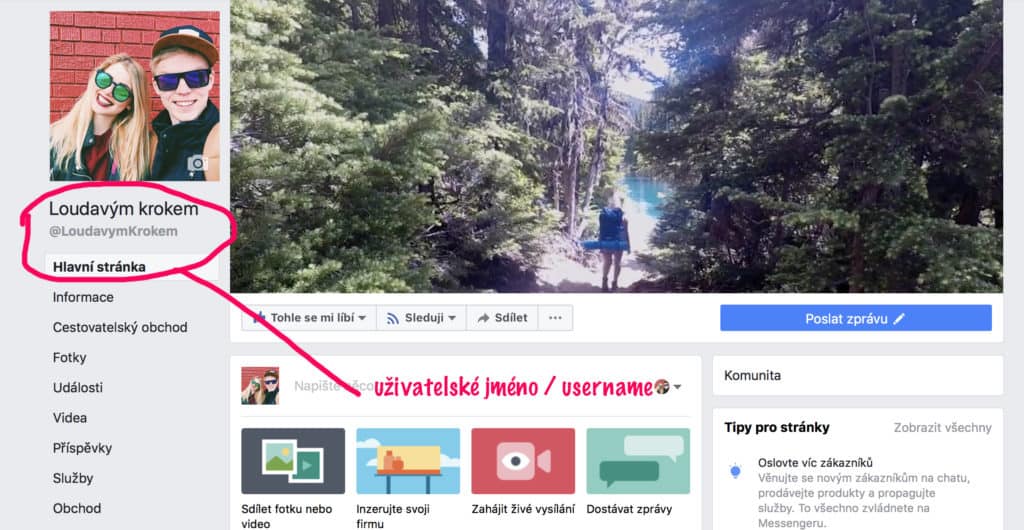
Choose your username carefully. If your blog name is quite long, try coming up with a short, memorable version that still makes it obvious what you’re about.
Your username will also appear in the URL for your Facebook page. We chose the same username as our blog name and Facebook page, so our link looks like this: https://www.facebook.com/LoudavymKrokem/
4) Tell Your Followers Your Story
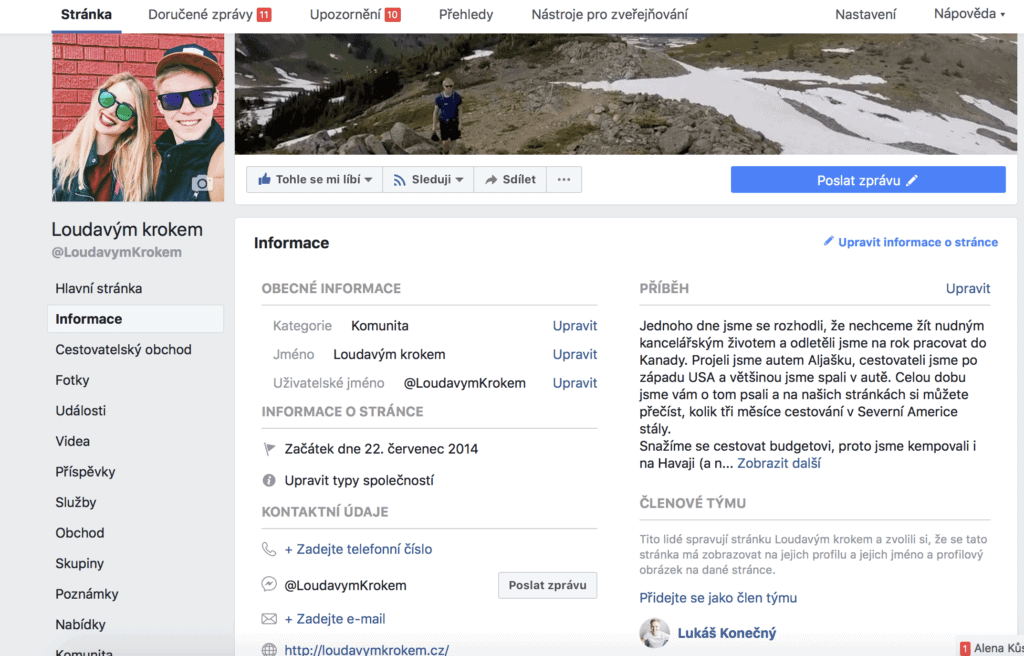
Once your page is set up, head to the About section and take a few minutes to fill it in properly. Pay particular attention to the Story field — tell your followers what you do and, just as importantly, why you do it.
Highlight what makes you unique. On Loudavým krokem, we always emphasise that we write about the real cost of travelling. There are countless travel blogs out there, but almost none of them tell you what their trips actually cost — and certainly not in as much detail. That’s what we make a point of highlighting in our page description too.
5) Set Up Your Call-to-Action Button
Facebook lets you add a call-to-action button that prompts visitors to take a specific action of your choosing:
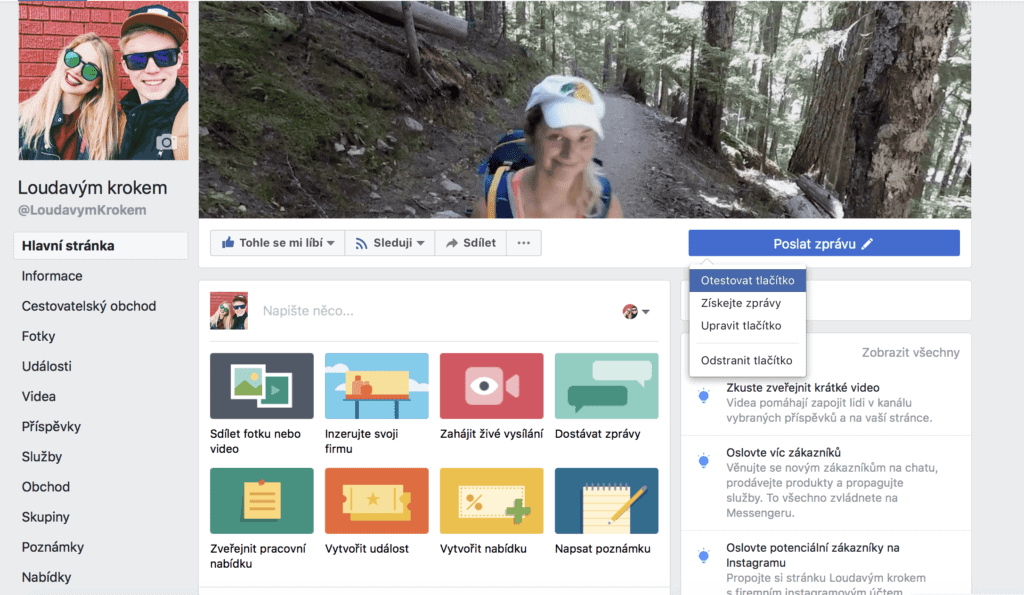
There’s a wide range of options to choose from — you can invite people to send you a message or email, direct them to your online shop, or link to an app.
And that covers all the basics of setting up your Facebook page!
You might also enjoy our guides on content marketing and email marketing that drives real revenue. And don’t miss our complete guide to SEO made simple.
Online Course: Facebook & Instagram Advertising Basics
Want to take things further? Check out this online course covering the fundamentals of Facebook advertising. Across 19 lessons (just under two hours), you’ll learn everything you need to get started.
What the course covers:
- Getting started with Business Manager
- How to choose the right campaign objective
- Setting up your first campaign
- Managing your budget and defining your audience
- How to evaluate your campaign results
- How to make your social media advertising genuinely effective

Tips and Tricks for Your Vacation
Don’t Overpay for Flights
Search for flights on Kayak. It’s our favorite search engine because it scans the websites of all airlines and always finds the cheapest connection.
Book Your Accommodation Smartly
The best experiences we’ve had when looking for accommodation (from Alaska to Morocco) are with Booking.com, where hotels, apartments, and entire houses are usually the cheapest and most widely available.
Don’t Forget Travel Insurance
Good travel insurance will protect you against illness, accidents, theft, or flight cancellations. We’ve had a few hospital visits abroad, so we know how important it is to have proper insurance arranged.
Where we insure ourselves: SafetyWing (simple monthly subscription) and TrueTraveller (for extra-long trips).
Find the Best Experiences
Get Your Guide is a huge online marketplace where you can book guided walks, trips, skip-the-line tickets, tours, and much more. We always find some extra fun there!


